
Airbnb is a popular service that connects hosts and guests, making it easy for travelers to find unique accommodations around the world. QR codes for Airbnb are a modern tool that allows hosts to provide quick and easy access to property details, house rules, Wi-Fi passwords, and more. But also, they can increase bookings seamlessly.
Let’s see how QR code tech can allow you to grow your hosting business while offering a superior guest experience.
Table of Contents
- What is an Airbnb QR code?
- Why Airbnb Hosts Should Use Airbnb QR Codes
- Dynamic QR Codes Versus Static QR Codes
- How to Create an Airbnb QR Code to Increase Bookings
- How to Use Airbnb QR Codes on Your Airbnb Property
- Wrap-Up
What is an Airbnb QR code?
An Airbnb QR code is a scannable code that uses QR code technology to quickly share information about your Airbnb property. When guests scan the code with their smartphone, it can direct them to a specific URL, such as your Airbnb listing page, where they can view property details, manage bookings, or access essential information.
Hosts can generate these QR codes using online QR code software like QR.io, which allows for easy creation and customization. You can link the QR code directly to your listing page or to other relevant resources.
There are two main types of Airbnb QR codes: static and dynamic. Static QR codes have a fixed URL and cannot be changed once created, while dynamic QR codes let you update the linked URL without reprinting the code, making them ideal for marketing and tracking.
Why Airbnb Hosts Should Use Airbnb QR Codes

Increasing property bookings
Airbnb QR codes can significantly increase your chances of getting more bookings by providing quick access and easy access to your property listing. When potential guests see your QR code on flyers, business cards, or social media, they can instantly scan it for immediate access to your Airbnb page, property details, and booking options.
This streamlined process makes it much easier for users to view your listing and complete reservations, helping you attract more potential guests and convert them into actual bookings.
By leveraging QR codes, Airbnb hosts can boost their Airbnb bookings by making the reservation process faster and more convenient for guests.
Additionally, using QR codes can help Airbnb hosts increase direct bookings by reducing reliance on booking platforms.
Enhancing guest experience with QR codes
QR codes offer quick access to essential information for guests, such as WiFi passwords, house rules, and local recommendations. This easy access improves communication between hosts and guests, making it simple to share important details and answer questions efficiently.
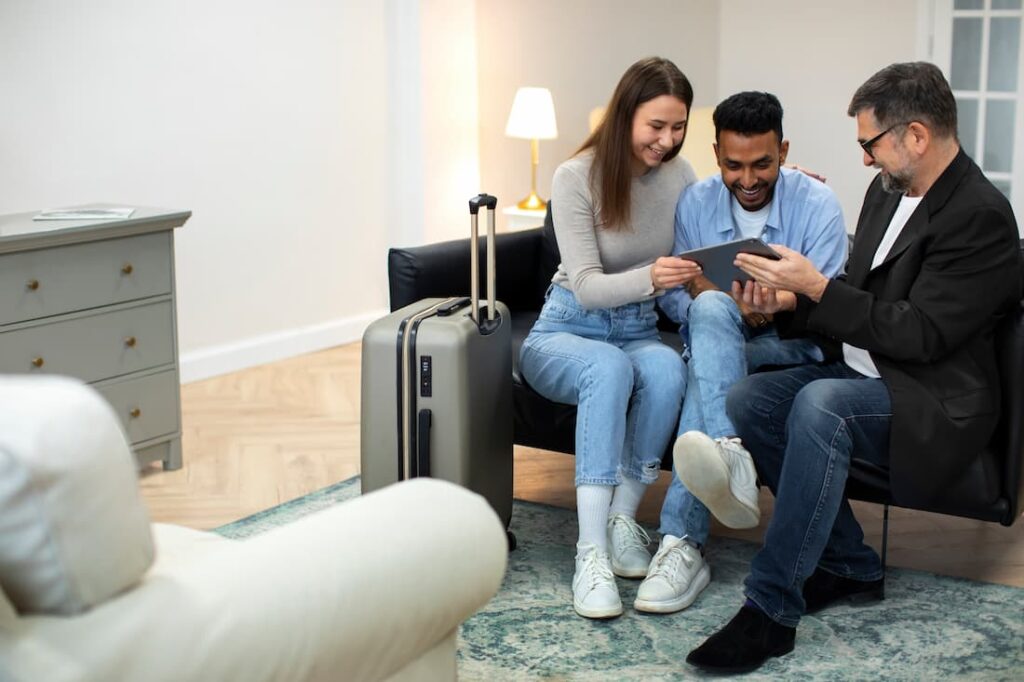
QR codes can also provide guest information, such as local attractions, local events, and local tips, to enhance the guest experience. Additionally, QR codes can link to personalized video greetings, virtual tours, or curated Google Maps to further enrich the guest experience.
Users benefit from the convenience of scanning a code to get everything they need, enhancing their overall experience and satisfaction.
Saving time for Airbnb hosts
By using QR codes, hosts can automate and simplify the process of sharing information, collecting feedback, and managing check-ins. This not only saves time but also ensures that users receive accurate and up-to-date details without the need for constant back-and-forth communication.
The streamlined process helps hosts focus on providing great service while reducing repetitive tasks.
Expanding marketing reach for listings
Including QR codes in your marketing materials extends your reach to more potential guests. With quick access to your listing, users are more likely to engage with your property and consider booking.
QR codes make it easy for anyone to find and share your Airbnb, increasing visibility and driving more bookings.
Integrating QR codes into promotional materials for your rental property can further enhance guest experience and boost bookings. Additionally, QR codes can be used to share promotional offers and discounts, which enhances marketing efforts for Airbnb listings.
Dynamic QR Codes Versus Static QR Codes
Dynamic QR codes are editable, allowing you to change the destination URL or content after the code has been printed or shared. This means you can update the information your guests access—such as a digital file like a house manual, guidebook, or welcome letter—without needing to reprint the QR code.
Another advantage of dynamic QR codes is tracking. You can monitor how often your Airbnb QR code is scanned, giving you insights into guest engagement and helping you improve your property management.
Static QR codes, on the other hand, are best for situations where the linked content will not change. They are suitable for sharing permanent information, but if you need flexibility or analytics, dynamic codes are preferable.
Many QR code generators offer free plans, making it easy and cost-effective for Airbnb hosts to create and use both static and dynamic QR codes.
How to Create an Airbnb QR Code to Increase Bookings
With our QR code generator, you can create QR codes that connect to multiple URLs and web pages. Start now and just follow these steps.
Step 1. Open an account in QR.io
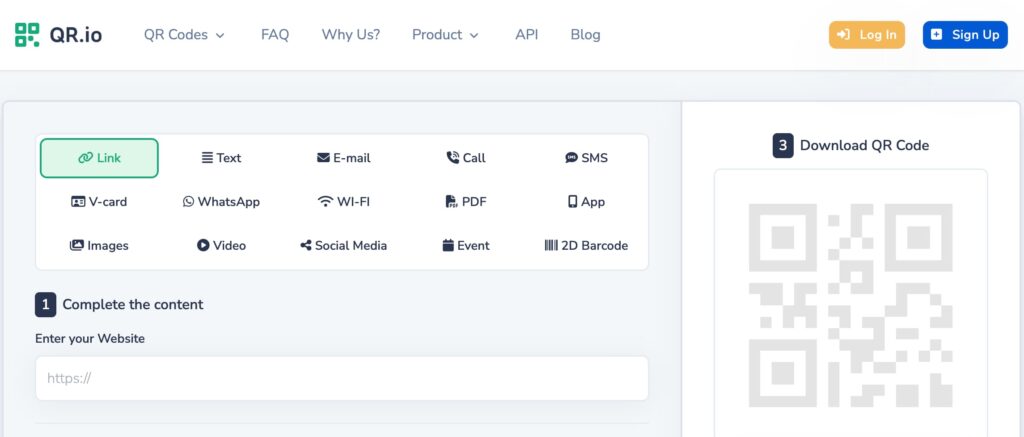
To create a URL QR code, you must open a QR.io account and start your 7-day trial. Just click Sign Up in the top-right corner of the homepage and enter your personal information.
Step 2. Click on + Create QR Code from your dashboard
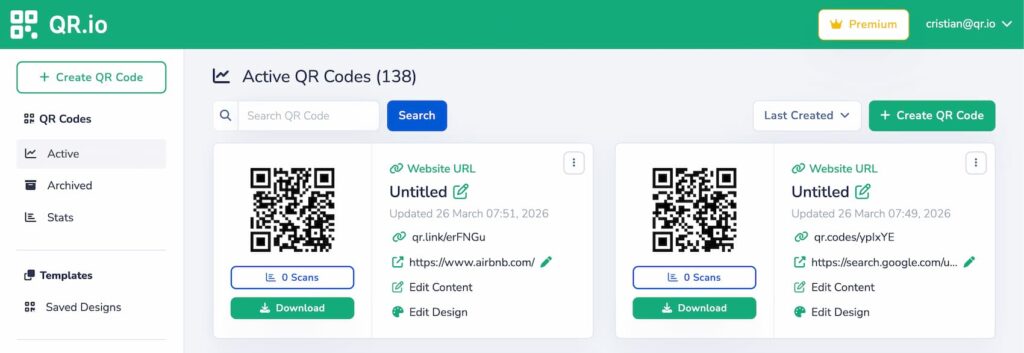
To start, click + Create QR Code on the top-right corner of your dashboard. This will take you to the several types of QR codes we offer.
Step 3. Select URL QR code
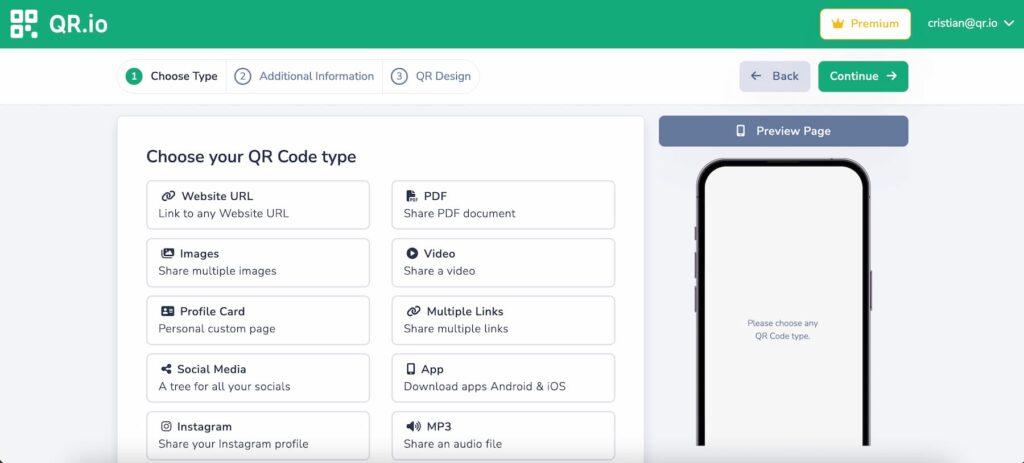
Choose Website URL QR code—it will be dynamic by default—and then click Continue.
Step 4. Enter your property listing URL
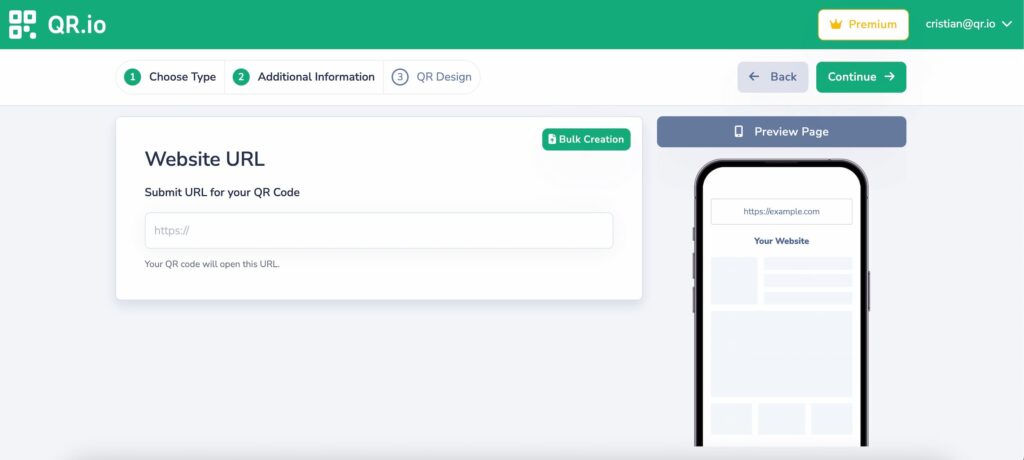
Add the Airbnb listing link and click continue.
Step 5. Customize your code
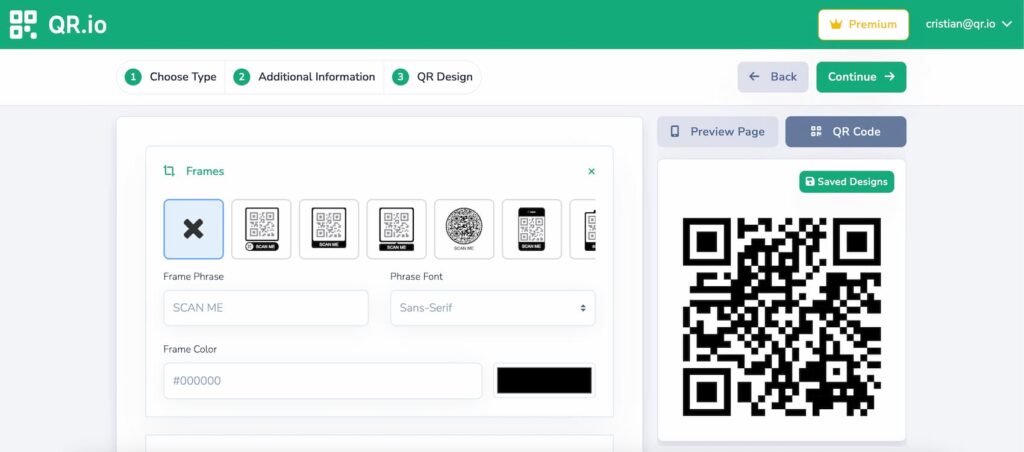
You can personalize your code by adding a frame, a call-to-action, and changing the color of the code’s elements, such as dots, marker borders, and center. You can also add the Airbnb logo!
Step 6. Download your code
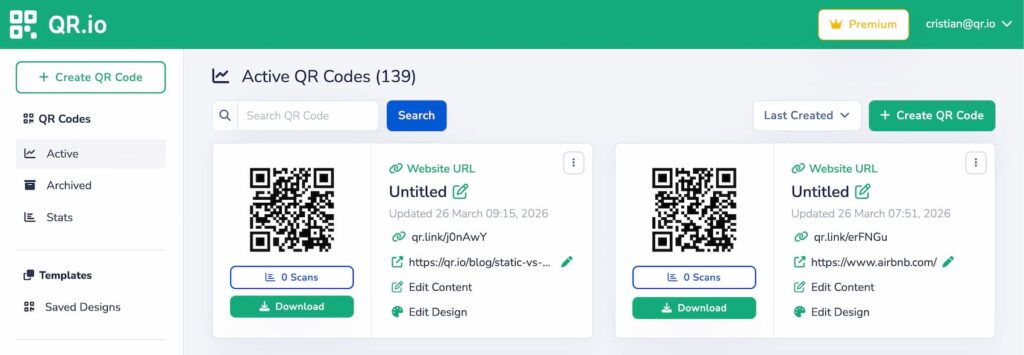
Once you’re done, download your code in PNG or SVG formats, depending on your needs and QR code scanning capabilities. PNG is more suitable for smaller prints like flyers, and SVG is perfect for large prints like billboards or banners.
Also see: QR Code PNG Format: How to Do It Right?
Step 7. Test your code
After a good QR code customization, you won’t want to see that you’ve invested a good deal of money in enormous prints and attractive designs in a code that’s not scannable or doesn’t link to the intended information.
So, you must test your QR codes. This can be done by printing a test code and testing it from different distances and under various lighting conditions.
How to Use Airbnb QR Codes on Your Airbnb Property
QR codes for Airbnb can unlock a myriad of practical uses that make your guests’ stay the most convenient.
Create PDF QR codes for welcome messages or house rules
Prime spots to place a PDF QR code to provide guests with essential information, such as house rules or a personalized welcome message. Place it in the entrance, living room, kitchen, and bedrooms. For maximum visibility, consider creating a welcome sign at the entrance that features the QR code.
To streamline the experience, combine multiple functions—like check-in instructions and travel guides—into one QR code for multiple links. This keeps everything organized and accessible for all your guests.
Create a WiFi QR Code for Easy Connections
Make it simple for your guests to get online by generating a WiFi QR code with details such as the network name and password. When guests scan the code, they are connected directly to your wifi network without needing to manually enter the password.
This QR code can securely store your WiFi password, ensuring guests have reliable internet access throughout their stay.
Place the WiFi QR code in a visible spot near the router or in your welcome guide. This makes it easy for guests to find and scan, streamlining their check-in experience and helping them connect to the internet quickly.
Reviews and Repeat Bookings
You can link a URL QR code to your review submission page, making it easy for guests to leave feedback after their stay. By scanning the QR code, guests can quickly access the review form, streamlining the feedback process and encouraging more responses.
Collecting feedback via QR codes helps you understand guest preferences and improve your property based on their insights.
Google Maps QR code to simplify guest navigation
A Google Maps QR code or a Waze QR code is one of the most practical tools you can offer guests, especially when your property is hard to find or located in a busy area. By linking directly to your location on Google Maps, you eliminate confusion and make arrival much smoother.
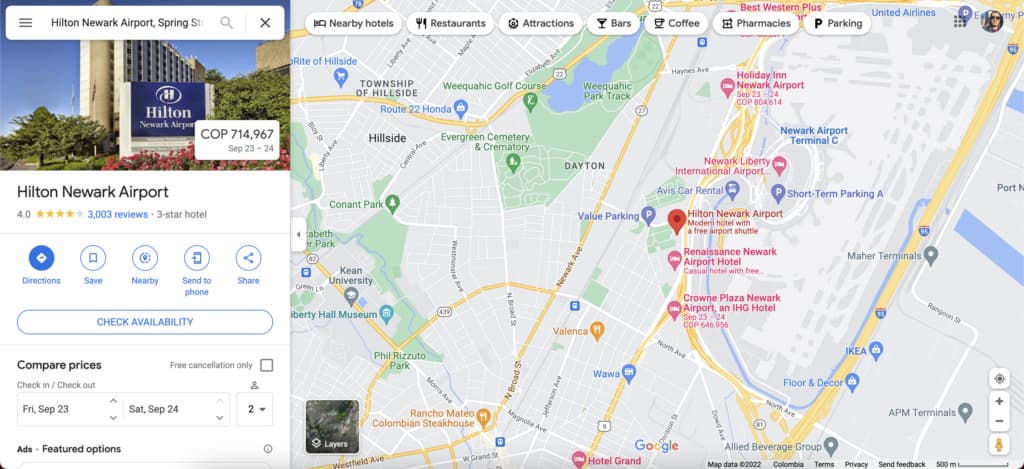
Instead of sending long written directions, you can provide a QR code that guests simply scan to open turn-by-turn navigation on their phones. This is particularly helpful for late-night check-ins, international travelers, or guests unfamiliar with the area.
Wrap-Up
Incorporating QR codes into your Airbnb strategy is a simple yet powerful way to modernize how you manage your property and interact with guests. From increasing visibility and driving more bookings to streamlining communication and reducing repetitive tasks, QR codes offer a flexible solution that adapts to both your operational needs and your guests’ expectations.
Ultimately, the value of QR codes lies in convenience. Guests get instant access to everything they need, while you gain more control, efficiency, and opportunities to stand out in a competitive market. By implementing QR codes thoughtfully—combining functionality, clear design, and strategic placement—you can elevate the overall guest experience, encourage better reviews, and increase repeat bookings over time.
Go to our QR code generator and start creating Airbnb QR codes that will increase your bookings and take your guest experience to the skies!